Suspended Roofing Google Business Profile: How to Appeal and Reinstate Your Listing
There is no phone call more stressful for a roofing contractor than waking up on a Monday morning and hearing your office manager say the phones have completely stopped ringing. You open Google Maps, type your company name, and find that your business listing has disappeared from the 3-Pack entirely. You log into your Google dashboard and see the red alert banner: "Your business profile has been suspended due to policy violations."
In the home service trades, a Google Business Profile suspension is an immediate operational crisis. You lose your primary source of inbound emergency leads, and your estimators sit in parked trucks with empty schedules. To understand how we triage and appeal account penalties, read our agency breakdown on Google Business Profile suspension reinstatement procedures.
Why Did Google Suspend My Roofing Company Business Listing?
The single biggest mistake contractors make after a suspension is panicking and immediately creating a brand-new profile at the same address. Doing so creates an instant duplicate listing violation. Google's automated anti-spam filters will flag both listings, blacklisting your phone number, website domain, and physical address from the map index.
Soft Suspension vs Hard Suspension: Knowing What Type of Penalty You Have
Before submitting any documentation to Google, you must determine what type of suspension your profile has experienced:
- Soft Suspension: Your listing is dropped from Google Maps and search results, but you can still access and edit your dashboard. This usually occurs when you make a minor change that triggers an automated review. Soft suspensions are typically resolved by submitting straightforward business verification records.
- Hard Suspension: Your entire business profile has been completely removed from Google's database. When you log in, your profile is locked, and all public reviews are invisible. Hard suspensions occur when Google suspects fraudulent ownership, address manipulation, virtual office usage, or severe violations of name guidelines.
The Danger of Keyword Stuffing: Why Adding City Names to Your Legal Name Gets You Banned
Adding words like "Best Emergency Roofing Sacramento" to your legal name violates Google guidelines. Your profile name must match your legal entity exactly as registered with the California Secretary of State Business Registry. Competitors routinely submit redressal complaints against keyword-stuffed names, triggering instant suspensions.
Virtual Offices and UPS Store Addresses: How Google Detects Fake Physical Locations
Claiming an address at a UPS Store, Regus co-working facility, or postal annex is an immediate suspension trigger. Google cross-references commercial real estate databases. If you do not operate from a dedicated commercial shop with permanent exterior signage, you must hide your address and register as a Service Area Business.
How Do I Appeal and Fix a Suspended Google Business Profile?
Reinstatement requires submitting an organized legal evidence packet directly through Google's official appeal portal.
Gathering the Official CSLB C-39 Evidence Packet: Commercial Leases, Utility Bills, and Tax Records
Prepare a single high-resolution PDF document containing your official business credentials: your active California CSLB Class C-39 specialty contractor license card, your registered articles of incorporation, your commercial equipment yard lease, your county business tax certificate, and a recent commercial utility invoice (electric or water) matching your business name and address.
Preparing for Live Video Verification: Proving Branded Fleet Trucks, Warehouses, and Tools
If Google requests video verification, plan an unbroken, unedited recording: start on the street showing the street sign and building exterior numbers; open the front door using your physical brass key; show framed licensing documents and office computers; then walk into the warehouse yard to show your wrapped fleet trucks, safety harnesses, shingle cutters, and ladder inventory.
What Should You Never Do After a Google Profile Suspension?
Navigating account recovery requires discipline and patience.
The Duplicate Profile Trap: Why Creating a New Listing Makes the Problem Worse
Never create a new profile while appealing a suspended listing. Google's automated security filters will instantly flag the second listing as deceptive duplicate behavior, permanently poisoning your domain name and phone number.
Protecting Primary Account Ownership from Rogue Agencies
A common cause of contractor profile lockouts is delegating primary ownership to an external digital marketing agency. If an unscrupulous agency registers your profile under their personal Gmail account and you later cancel your contract, they may hold your listing hostage or delete it entirely.
Always maintain primary owner status on a corporate Google Workspace email account owned by your company. Grant marketing agencies standard manager access only. Retaining absolute control ensures that third-party contractors can never compromise your most valuable digital asset.
How Long Does Google Take to Review Contractor Reinstatement Appeals?
Google typically reviews contractor appeals within three to seven business days. Submitting a complete, organized evidence packet on the first attempt prevents lengthy review delays and secondary denials.
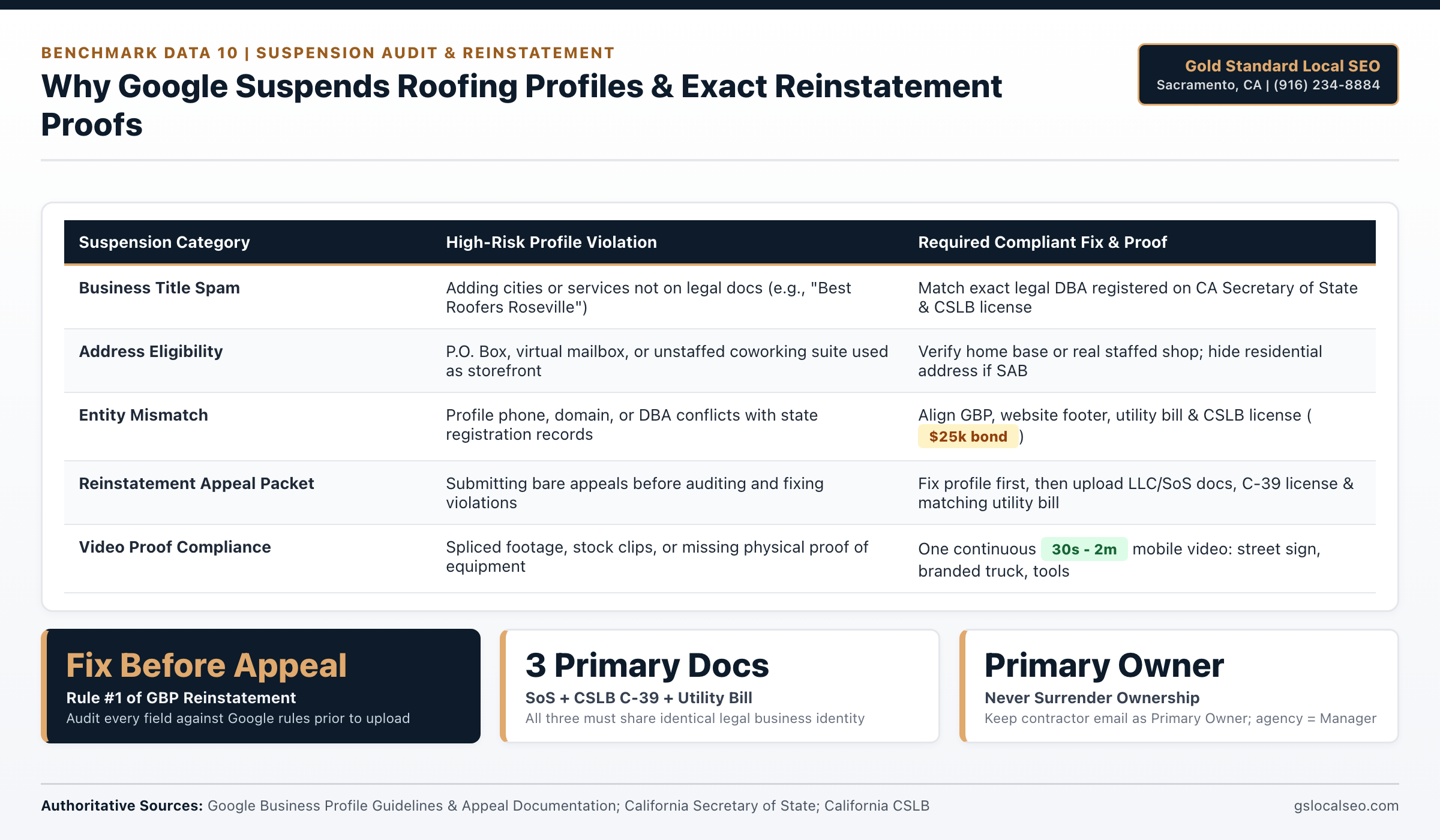
GBP Suspension Triggers & Reinstatement Evidence Matrix
Google Business Profile Guidelines require roofers to fix every policy violation before appealing and attach matching California Secretary of State, CSLB C-39 license, and utility records alongside unedited video proof.
| Profile Area | Common Suspension Cause | Required Reinstatement Standard | Primary Authority Source |
|---|---|---|---|
| Business Title | Adding unpaid city or service keywords | Exact legal name from LLC / FBN registration | Google Business Profile Help |
| Address Eligibility | P.O. Box, virtual mailbox, or unstaffed suite | Real staffed yard or hidden-address SAB | Google Business Profile Help |
| State & Trade Docs | Mismatched DBA, phone, or domain on filings | CA SoS filing + active CSLB C-39 ($25k bond) | CA Secretary of State / CSLB |
| Utility Proof | Bill missing service address or under personal name | Utility bill matching exact business name & address | Google Business Profile Support |
| Video Verification | Edited clips, blurry tools, or wrong location | 30s to 2m continuous unedited mobile video | Google Business Profile Support |
Sources: Google Business Profile Representation & Appeal Guidelines; California Secretary of State (bizfileOnline); California CSLB.
Local Sacramento Valley Roofing & Climate Considerations
Profile compliance across Sacramento County requires active alignment with state and local regulatory authorities.
Pricing, Scope & Contractor Fit Requirements
First-hand Greater Sacramento field testing (Folsom, Roseville, and Citrus Heights C-39 contractor campaigns) shows map-pack calls scale fastest when pricing and scope match your crew capacity:
- Flat Monthly Rate: $297/month for single-city Google Business Profile management, Automated Past & Future Customer 5-Star Review Campaign, and speed-to-lead intake; $0 setup fees and month-to-month terms with zero 12-month contracts.
- Multi-City Expansion Option: Full 30-website city and trade rollouts build at 10 websites per month over 90 days so every target zip code indexes cleanly.
- Best Fit: Active California CSLB C-39 licensed roofing contractors carrying mandatory workers' compensation coverage who want $15,000+ roof replacement and commercial repair calls without paying shared lead brokers.
- When to Wait: Brand-new startups without an active CSLB license, zero completed customer jobs, or no crew capacity to answer estimate calls within 60 seconds.
Next Guide in the Series
Once your profile is fully reinstated and protected, you can safely expand your reach into surrounding cities. Learn how to grow your coverage area legally in our next guide: How to Expand Your Roofing Service Area Radius on Google Maps.
Build Your Sacramento Roofing Lead Engine
At Gold Standard Local SEO (Folsom & Sacramento, CA), we deploy dedicated city and trade websites, Google Business Profile optimization, and our Past & Future Customer 5-Star Review Engine. Flat $297/month. Month-to-month terms with zero lock-in contracts.
Call (916) 234-8884 to Get Started Today