How to List and Optimize a Roofing Business on Google: Step-by-Step Profile Checklist
Most roofing contractors fail to rank on Google Maps not because their competitors have better crews, but because their digital listings contain technical errors. In the roofing trade, if three pipe flashing boots are unsealed and valley metal is misaligned, the whole roof leaks regardless of how clean the shingles look. The exact same rule applies to your Google Business Profile.
If your profile has conflicting category designations, an unverified address, or an outdated phone number, Google's algorithms will quietly suppress your business. To ensure your company satisfies all fundamental search standards, compare your configuration against our master Sacramento local SEO checklist for contractors.
What Category Should a Roofing Company Be on Google Business Profile?
Setting your primary category accurately is non-negotiable. Google uses the primary category to determine what core search queries your map listing qualifies for. If an agency mistakenly set your primary category to "General Contractor," Google will prioritize dedicated roofing competitors ahead of you every time a homeowner searches for emergency re-roofing.
The Primary Designation Rule: Locking in "Roofing Contractor" First
Locking in "Roofing Contractor" as your primary designation tells Google's semantic index that your core commercial operations focus on roof systems. This single setting accounts for significant algorithmic weight during map pack calculations.
Strategic Secondary Category Layering: Adding Waterproofing, Siding, and Gutters Safely
While your primary category must remain focused, secondary categories allow you to capture high-margin ancillary work. Add secondary tags carefully: "Waterproofing Service" captures commercial deck and below-grade foundations; "Gutter Cleaning Service" and "Gutter Service" capture water diversion jobs; and "Siding Contractor" captures complete exterior renovations.
Can I Run a Roofing Business from Home Without Showing My Personal Address?
Many independent roofing contractors start their businesses from a residential home before leasing a commercial equipment yard. Google fully supports home-based contractors through specific profile configurations.
Navigating Hidden Address Configurations for Service Area Businesses (SAB)
If you operate from a residential address, you must register as a Service Area Business (SAB) and select the option to hide your street address. Displaying a residential address without permanent commercial signage violates Google guidelines and will eventually trigger an account suspension.
Protecting Home Workspace Privacy While Maintaining Maximum Map Prominence
Operating as an SAB allows you to define up to twenty service cities (such as Sacramento, Roseville, Folsom, and Elk Grove) while keeping your family's home address completely private. Your map listing will display your company name, verified phone number, website link, and five-star reviews without showing a street pin.
What Documents Does Google Require to Verify a Roofing Contractor Listing?
Google verification for trade contractors has become rigorous. Google routinely demands verified documentation and live video audits before approving a profile.
The LLC Verification Loop: Aligning California Secretary of State Records
Your legal business name, physical address, and entity structure must match your official corporate records filed with the California Secretary of State and your CSLB C-39 license database. Discrepancies between your public profile name and state records will cause automated verification rejections.
Passing Live Video Audits: Proving Tool Inventory, Uniforms, and Wrapped Fleet Trucks
When Google requests video verification, prepare your recording path beforehand. Film a continuous, unedited video clip showing: the exterior street sign, your commercial building number, permanent shop signage, your key opening the shop door, framed licensing documents on the wall, and your branded work trucks, ladder racks, and tool inventory in the warehouse yard.
Acceptable Document Ledgers: Commercial Utility Invoices and Business Licenses
Maintain digital copies of your official verification documents: your active CSLB Class C-39 license card, your commercial general liability insurance policy, your Sacramento County business tax certificate, and a recent commercial utility invoice (electric, water, or commercial internet) addressed to your company name and street location. Guidelines from Google Business Profile Support confirm that official utility records carry the highest trust weighting for account validation.
Managing California CSLB Subcontractor and Crew Compliance
Google's local trust systems evaluate business legitimacy by analyzing employee and operational signals. If you use subcontractors for specialized jobs like gutters or solar detachment, ensure all subcontractors hold active workers' compensation policies on file. Maintaining strict compliance with CSLB regulations prevents state stop-work orders that can instantly disrupt your business operations and trigger sudden search suspensions.
Furthermore, keeping photo records of weekly safety tailgates and OSHA-mandated safety meetings reinforces your operational credibility. Uploading photos of your crew in OSHA-approved safety harnesses, hard hats, and branded company shirts provides visual proof that separates your firm from unlicensed weekend crews.
How Often Should Roofers Post and Upload Photos to Google Business Profile?
High-ranking contractors upload two to four fresh job site photos every week. Upload photos of real installations: standing seam metal panels on a foothill home, flat commercial TPO heat-welded seams, and clean architectural shingle tear-offs. Regular uploads signal continuous business activity to Google crawlers and provide visual proof that converts visiting property owners.
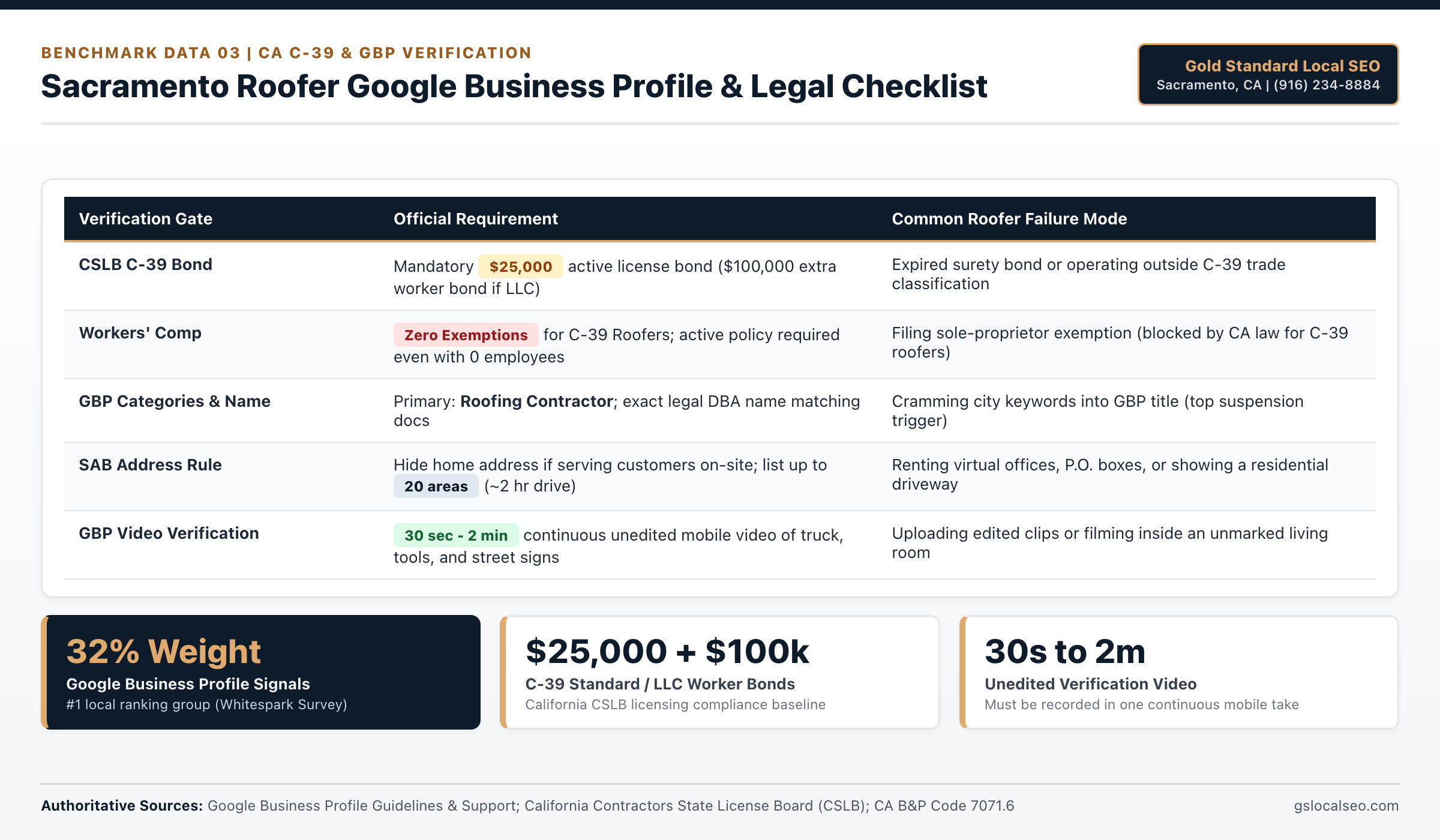
Sacramento C-39 & Google Business Profile Compliance Table
California B&P Code 7071.6 mandates a $25,000 contractor bond and strict Workers' Compensation coverage for every Class C-39 roofer, while Google requires exact unedited video proof and clean categories.
| Compliance Item | Mandatory Standard | Verification Risk if Skipped | Primary Authority Source |
|---|---|---|---|
| Contractor license bond | $25,000 active bond ($100k extra worker bond if LLC) | License suspension blocks GBP appeal proofs | CA CSLB (B&P Code 7071.6) |
| Workers' Compensation | Mandatory for all C-39 roofers (0 exemptions) | Solo exemption filings are invalid in CA C-39 | California CSLB C-39 Rules |
| GBP Primary Category | Exact: Roofing Contractor | Generic categories suppress repair & replacement reach | Google Business Profile Help |
| Service-Area Boundaries | Up to 20 named cities/ZIPs (~2 hr drive radius) | Radius miles unsupported; fake pins risk ban | Google Business Profile Help |
| GBP Video Verification | 30 sec to 2 min continuous unedited mobile video | Spliced clips or unmarked rooms get rejected | Google Business Profile Support |
Sources: California Contractors State License Board (CSLB); California Business & Professions Code 7071.6; Google Business Profile Help Center.
Local Sacramento Valley Roofing & Climate Considerations
Proper profile optimization requires understanding local geographic and municipal realities across Northern California.
Pricing, Scope & Contractor Fit Requirements
First-hand Greater Sacramento field testing (Folsom, Roseville, and Citrus Heights C-39 contractor campaigns) shows map-pack calls scale fastest when pricing and scope match your crew capacity:
- Flat Monthly Rate: $297/month for single-city Google Business Profile management, Automated Past & Future Customer 5-Star Review Campaign, and speed-to-lead intake; $0 setup fees and month-to-month terms with zero 12-month contracts.
- Multi-City Expansion Option: Full 30-website city and trade rollouts build at 10 websites per month over 90 days so every target zip code indexes cleanly.
- Best Fit: Active California CSLB C-39 licensed roofing contractors carrying mandatory workers' compensation coverage who want $15,000+ roof replacement and commercial repair calls without paying shared lead brokers.
- When to Wait: Brand-new startups without an active CSLB license, zero completed customer jobs, or no crew capacity to answer estimate calls within 60 seconds.
Next Guide in the Series
With your profile checklist verified, learn how Google's algorithms calculate rankings across competitive local zip codes. Continue to our ranking analysis: How to Rank in the Google 3-Pack for Roofing in Sacramento and Northern California.
Build Your Sacramento Roofing Lead Engine
At Gold Standard Local SEO (Folsom & Sacramento, CA), we deploy dedicated city and trade websites, Google Business Profile optimization, and our Past & Future Customer 5-Star Review Engine. Flat $297/month. Month-to-month terms with zero lock-in contracts.
Call (916) 234-8884 to Get Started Today